1. What is Apollo Circle Membership?
Apollo Circle Membership is the paid loyalty programme
of Apollo 24|7, Apollo’s pharmacy and healthcare app. Members
typically receive benefits such as free doctor consultations, cashback on medicine orders, and free medicine
delivery.
2. What is the offer?
All active Airtel users get 6 months of Apollo Circle Membership for
free, the following benefits:
- Free doctor consultation on call
- 15% cashback on medicines ordered via the Apollo 24|7 app and at Apollo Pharmacy stores
- Unlimited free delivery on all orders
3. Who is eligible for this offer?
This offer is available to all active Airtel subscribers
with prepaid, postpaid, Wi-Fi, or DTH connections.
4. How do I redeem the offer?
You can redeem the offer via the Airtel
app.
Follow these steps:
- Open the Airtel app and log in with your Airtel number.
- Go to the Rewards & OTTs section or Claim OTTs & More.
- Click on the Apollo 24|7 card.
- Tap Claim Now and then Proceed.
- You will be redirected to the Apollo 24|7 landing page.
- Log in or sign up using your mobile number.
- The coupon code will be applied automatically. Set up auto-pay at Rs. 2 to complete the transaction and activate the membership.
5. How long is the offer available?
The offer is available from 13th
October 2026 to 13th December
2026
6. When does the validity of subscription commence?
The subscription validity starts from
the date the offer is successfully claimed.
7. What happens after the validity of my subscription expires?
The subscription ends after
the free trial and will be auto-renewed by Apollo. To avoid being charged, you must cancel
the mandate before the trial period ends.
8. What happens if I already have an Apollo Circle Membership?
You can still claim 6 months
of membership through the Airtel app. Your existing membership validity will be extended by
6 months. For example, if you have 3 months remaining on your existing Circle Membership, after redeeming the
Airtel
offer, your total Circle Membership validity will become 9 months. Auto-pay will be triggered after 9 months.
9. Who do I contact if I face issues with a benefit?
In case of any eligibility related
and/or technical issues faced while claiming the offer, you can contact Airtel
customer care support via Airtel app.
For issues related to the completion of redemption process on Apollo 247 app and/or benefits related to the
offer, you
can connect with customer care support of Apollo at helpdesk@apollo247.com
1. What is the Free International Roaming Benefit?
Airtel customers on new
Postpaid plans can
claim a Free International Roaming benefit that includes 5GB Data, 60 Call
Minutes, and 25 Outgoing SMS, valid for 5 days.
2. Is this benefit available to all Airtel Postpaid customers?
These benefits are
available to
customers on Postpaid plans which offer International Roaming benefits and can be
claimed from Rewards and OTTs section of Airtel App. New customers will become after completing 90
days on these
plans.
Existing customers can upgrade to these new plans, in order to claim, they must have completed at
least 90 days on
any
Airtel Retail Postpaid plan.
3. How can I claim this benefit?
These benefits need to be claimed from Rewards
and OTTs
section on Airtel App.
4. I am an existing Airtel Postpaid customer; how do I use this benefit?
You can
upgrade to
one of the Postpaid plans which offer these International Roaming benefits and claim the benefit
through the Airtel
App once you become eligible after 90 days on postpaid. Navigate to the Rewards & OTT section and
complete the claim
journey.
5. I am an existing Airtel Prepaid customer; how do I get this benefit?
Existing
Prepaid
customers can upgrade to Postpaid Plans which offer International Roaming benefits. To be eligible for
the benefits,
they must have completed at least 90 days on any Airtel Retail Postpaid plan.
6. I am a non-Airtel customer; how do I get this benefit?
You can port to Airtel
postpaid from
the Airtel App or by visiting your nearest Airtel store. Once you have upgraded to an Airtel Postpaid
plan, you can
claim the benefit through the Airtel App after 90 days. Navigate to the Rewards & OTT section and
complete the claim
journey.
7. How many times can I claim this benefit?
The Free International Roaming
benefit can be
claimed once every 12 months while you remain on an Airtel Postpaid plan.
8. When does my benefit become active?
The benefits are activated once you latch
on to
International Roaming network in any of the 180 plus eligible countries, after a successful claim. The
benefit will
then remain valid for 5 continuous days.
9. What is the validity of the International Roaming benefits in the plan?
The
International
Roaming benefits of 5GB Data, 60 Call Minutes, and 25 Outgoing SMS, remain valid for 5 days from the
day customer
latches on to the International Roaming network.
10. Are the International Roaming benefits available to all numbers in my Family
Plan?
Yes, in
case of Postpaid Family plans all connections i.e. Parent and Voice Add-On (free or paid) can
individually claim
these benefits.
11. Will this be included in my One Airtel Plan as well?
Yes. This free benefit
being a part
of your postpaid plan will be included in your One Airtel Plan.
12. Is there any commitment associated with claiming this benefit?
Yes, by
claiming and using
the Free International Roaming benefits, you agree to continue on any Airtel Postpaid Plans for a
minimum of 90 days
from the date of usage of benefits. In case you decide to leave Airtel Postpaid by disconnecting your
connection,
porting to another operator, or migrating to prepaid, you will have to pay the exit charge of 2000+
GST( 2360)
13. What happens if I leave Airtel postpaid (port out, disconnect, migrate to prepaid) within
90 days of
using the benefit?
An exit charge of ₹2,000 + GST will be levied in your subsequent bill
if you leave
postpaid (disconnect your connection, port out to another operator, or migrate to prepaid) within 90
days of using
the benefit. For Family Plans, if any eligible add-on number has claimed and used the benefit, the
applicable exit
charge will be levied separately for each such number.
14. What happens after the 5-day validity expires?
After the 5-day validity
expires, standard
International Roaming charges will apply. To avoid pay-per-use roaming charges, you can purchase an
International
Roaming pack through the Airtel App.
15. Can I transfer this benefit to another Airtel number?
No, the benefits cannot
be
transferred to another number, it can only be used by the eligible Airtel Postpaid number for which
the benefit has
been claimed.
16. Will unused data, minutes, or SMS be carried forward?
No. Any unused benefits
will expire
at the end of the validity period and will not be carried forward.
17. How do I know if my FREE International Roaming benefit is active?
After
claiming the
benefit, you will receive a confirmation message. Once you arrive at an eligible international
destination and
connect to a partner network, you will receive another communication confirming activation of your
Free IR benefit.
You can also track the benefit status on the Airtel App.
18. Where can I check my benefit usage and validity?
You can track your
International Roaming
benefit usage and validity through the Airtel App in your plan details. For any queries on
International Roaming,
please reach out to customer care team.
What is iCloud+?
iCloud+ is a bundled proposition which offers 50GB cloud storage
, Apple TV, and Apple Arcade subscriptions
What benefits do I get with Apple iCloud+ through Airtel?
With the Airtel offer,
eligible customers get:
- Apple iCloud+ benefit included as part of their eligible Airtel Postpaid plan (₹1049 and above).
- Perpetual/lifetime access to the benefit, as long as the customer continues to hold the eligible Airtel plan.
- Additional iCloud storage of 50GB and premium iCloud+ features available as part of the bundled benefit.
Who is eligible for the Apple iCloud+ benefit?
All customers on eligibles plans
using iOS devices are eligible for complete Apple iCloud+ benefits.
Customers who are not using iOS devices shall continue to get Apple TV subscription as part of their
plan benefits.
I am currently enjoying Apple TV through Airtel. What happens to my existing
benefit?
Existing customers who have already claimed Apple TV will continue to enjoy
their current Apple TV benefit.
Customers on iOS devices will have the option to independently claim iCloud+ through the Airtel App.
Do I need to pay separately to continue using iCloud+?
No. The
benefit is included as part of the eligible Airtel Postpaid plan and continues
perpetually/lifetime, subject to
the customer continuing on the eligible plan.
How do I get iCloud+ with Airtel?
Eligible customers can claim iCloud+ through
the Airtel App.
Journey: Home > Rewards & OTTs > Apple iCloud+ Claim Card
Follow the on-screen instructions to complete activation using your Apple ID.
Will Apple Music be impacted by this change?
No. There is no
change to the existing Apple Music benefit. Apple Music will continue to be offered as per
the current
eligibility framework across eligible customer segments.
What happens if I switch from Android to iOS?
Customers who switch to iOS devices
become eligible to claim Apple iCloud+ benefits via Airtel app subject to plan
eligibility.
What happens if I switch from iOS to Android?
In
case you switch from iOS to Android device and have claimed the iCloud+ benefit, you will not be able
to access cloud
storage and Arcade, as these benefits are only available on iOS devices. Apple TV will continue to
work for customers on
both iOS and Android devices.
What happens if I move to a non-eligible Airtel plan?
If you discontinue or
migrate from an eligible Airtel Postpaid plan, your Airtel-bundled iCloud+ benefit may no longer
be available, in accordance with Airtel's benefit eligibility terms.
What should I do if I am unable to activate or access Apple iCloud+?
For issues
related to Airtel plan eligibility, benefit activation, or redemption, please contact Airtel
Customer
Support.
For issues related to:
- Apple ID
- iCloud account
- Storage access
- Device synchronization
- Apple service functionality
Please contact Apple Support.
I already have a paid iCloud+ subscription. What happens if I claim the Airtel iCloud+
benefit?
If you already have an existing iCloud+ subscription directly with Apple, the
Airtel benefit will be applied to your
Apple Account upon successful redemption. You will continue to get the higher-tier benefit, although
your benefits will
not stack and will not result in increased storage.
Can I upgrade to a higher iCloud+ storage plan after claiming the Airtel
benefit?
Yes. Customers who require additional storage beyond the Airtel-included
iCloud+ benefit may choose to upgrade to a
higher iCloud+ plan directly through Apple. Any incremental charges for the upgraded storage plan will
be billed by
Apple.
What happens if I downgrade my iCloud+ plan after claiming the Airtel benefit?
If
you have upgraded to a higher storage tier directly with Apple and subsequently downgrade your plan,
your
subscription will be adjusted in accordance with Apple's subscription policies. The Airtel-included
benefit will
continue to be available as long as you remain on an eligible Airtel Postpaid plan.
What happens if I cancel my existing Apple subscription after claiming the Airtel
benefit?
If you cancel a separately paid Apple subscription, your access to the
Airtel-included iCloud+ benefit will continue,
provided you remain on an eligible Airtel Postpaid plan and have successfully redeemed the benefit
through Airtel.
I have already claimed Apple TV through Airtel. Do I need to claim it again?
No.
Customers who have already activated Apple TV through Airtel will continue to enjoy their existing
Apple TV benefit.
They only need to claim the new iCloud+ benefit separately through the Airtel Thanks App.
As
iCloud+ is a bundled proposition containing iCloud+ 50GB, Apple TV, and Apple Arcade, the customer
will be upgraded
and will have access to additional benefits.
What is Super Duolingo?
Super Duolingo is the premium subscription of Duolingo,
offering
ad-free learning, unlimited mistakes, personalized
practice, and additional features to enhance language learning.
What is the offer?
All active Airtel users get 12 months of Super Duolingo for
free, worth
INR 3120.
Who is eligible for this offer?
This offer is available to all active Airtel
Subscribers
with prepaid, postpaid, Wi-Fi, or DTH subscriptions.
How do I redeem the offer?
You can redeem the offer via the Airtel App.
Follow
the below
steps:
- Open the Airtel app and log in with your Airtel number.
- Go to the Rewards & OTTs section or Claim OTTs & More.
- Click on Super Duolingo card.
- Tap Claim Now then click on Proceed
- Complete the registration process on Duolingo. You can log in (if you already have a Duolingo account) or register a new account (if you do not yet have a Duolingo account) following the instructions. After successfully logging into your Duolingo account, the redemption will be automatically activated.
How long is the offer available?
The offer is available between 3rd September
2026 to 2nd
December 2026.
When does the validity of subscription commence?
Validity commences from the date
of the
successful claim of offer.
What happens after the validity of my subscription expires?
The subscription ends
after the
free trial and does not get auto renewed.
Who do I contact if I face issues with a benefit?
In case of any eligibility
related and/or
technical issues faced while claiming the offer, you can contact Airtel
customer care support via Airtel app.
Who do I contact if I face issues with a benefit?
In case of any eligibility
related and/or
technical issues faced while claiming the offer, you can contact Airtel
customer care support via Airtel app.
For issues related to the completion of redemption
process on
Duolingo app and/or benefits related to the offer, you can
connect with customer care support of Duolingo at super-support@duolingo.com.
What is the Apple iPhone offer available through Croma?
Croma is offering special
Airtel-exclusive discounts on the iPhone 15, iPhone 16, iPhone Air, iPhone
17, iPhone
17 Pro,
and iPhone 17 Pro Max models.
What benefits are included in this offer?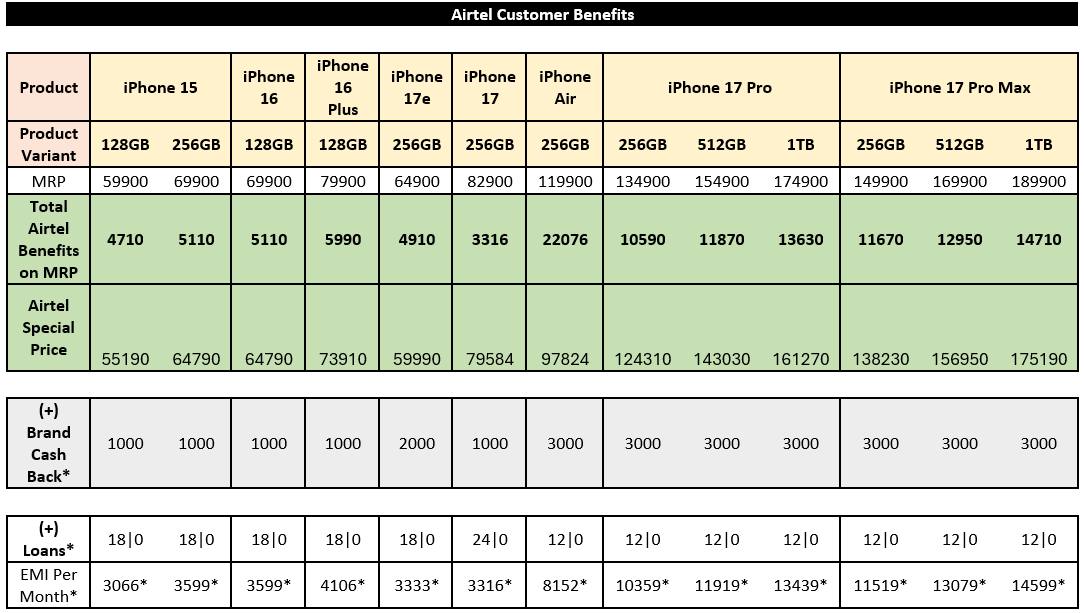
Who can avail of this offer?
The offer is open to all active Airtel customers
with a prepaid,
postpaid, Wi-Fi, or DTH connection.
How can I claim the offer?
You can claim the offer through the Airtel
app.
Follow these
steps:
- Open the Airtel app and sign in using your Airtel number.
- Navigate to Rewards & OTTs or Claim OTTs & More.
- On the Croma card, select the Apple iPhone offer via Croma.
- Tap Claim Now, and then select Proceed.
- After you tap Proceed, the coupon code will be sent to you by SMS.
- The coupon code is unique to you and can be redeemed oncom or at your nearest Croma store.
- Copy the Coupon Code at Croma.com and complete the purchase journey or show the coupon code at Croma store to complete the purchase journey.
What is the offer period?
The offer is valid from 12th August 2026 to 5th
September 2026
When will the coupon expire?
All the coupons issued from 12th August 2026 to 5th
September
2026
can be redeemed till 5th September
2026.
What is the Airtel User benefit on iPhone 17 Pro Max (256GB Variant)?
The MRP of
iPhone 17
Pro Max on croma.com & at Croma stores is ₹149,900 and Airtel users will get
instant
discount of
₹11,670 upon redeeming the coupon code.
Other benefits which are exclusive at Croma
Stores:
Brand Cashback
(Bank Offer)- ₹3000*
Exchange Cashback Benefit- Up to ₹12,000*
*TnC Apply
Whom should I contact if I face an issue with the offer?
For eligibility-related
or technical
issues while claiming the offer, contact Airtel customer support
through
the Airtel
app.
For problems completing coupon redemption or for coupon ineligibility queries, you can connect with customer care support of Croma at customersupport@croma.com, WhatsApp at 9452594525.
What is Pocket FM Premium?
Pocket FM Premium gets you 60 extra unlocked
listening minutes
daily for every show + Ad Free
listening
What is the offer?
In this offer, all active Airtel users will get 3 months of
Pocket FM
Premium for free.
Who is eligible for this offer?
This offer is available to all active Airtel Subscribers with prepaid, postpaid, Wi-Fi, or DTH
subscriptions.
How do I redeem the offer?
You can redeem the offer via the Airtel App.
Follow
the below
steps:
- Open the Airtel app and log in with your Airtel number.
- Go to the Rewards & OTTs section or Claim OTTs & More.
- Click on the Pocket FM Premium card.
- Tap Claim Now, then click Proceed to redeem the offer.
- You will receive a confirmation SMS after successfully claiming the offer.
- Sign in or sign up on the Pocket FM app using the same Airtel number used to redeem the offer and enjoy the benefits.
How long is the offer available?
The offer is available between 3rd August 2026
and 3rd
November 2026.
When does the validity of subscription commence?
Validity commences from the date
of the
successful claim of offer.
What happens after the validity of my subscription expires?
The subscription ends
after the
free trial and does not get auto renewed.
Who do I contact if I face issues with a benefit?
In case of any eligibility
related and/or
technical issues faced while claiming the offer, you can
contact
Airtel customer care support via Airtel app.
For issues related to the completion of redemption process on Pocket FM app and/or benefits related to the offer, you can connect with customer care support of Pocket FM at care@PocketFM.com
1. What is the Lock Upp – Sach ya Sazaa voting program?
Lock Upp viewers can support their favourite inmate through the Airtel App. Based on audience voting, selected inmates will receive the special "Talktime Ki Taaqat Card" opportunity during the show.
2. Who can participate in the Netflix Lock Upp Talktime Ki Taaqat program?
The program is open to both Airtel and non-Airtel users.
3. Do I need to log in to the Airtel app?
Yes. Users must be logged in to the Airtel App platform to support their favourite inmate.
4. How do I support my favourite Netflix Lock Upp inmate?
- Open the Airtel App.
- Log in using your mobile number.
- You will see a banner which will redirect you to the program page.
- Select your favourite inmate from the inmates list.
- Submit your decision.
- You will see a confirmation screen once your submission is successfull.
5. How many times can I support my favourite inmate?
You can support your favourite inmate once per day during the program period.
6. Can I support multiple Netflix Lock Upp inmates on the same day?
No. Only one selection can be done per registered mobile number per day.
7. Can I change my selection after submitting?
No. Once submitted, a selection cannot be modified, changed, or withdrawn.
8. When does Netflix Lock Upp Talktime Ki Taaqat program begin and end?
Voting timelines will be communicated on the program page and may vary based on the show's schedule.
9. How are inmates selected for Talktime Ki Taaqat Card?
Inmates receiving the highest number of valid selections during the applicable voting window will be eligible for the Talktime Ki Taaqat Card opportunity, subject to the show's rules and production requirements.
10. Will I be able to see the Netflix Lock Upp results?
Results and announcements will be communicated as per the show's schedule and partner guidelines.
11. What happens if my favourite Netflix Lock Upp inmate gets eliminated?
Eliminated inmates may no longer be available for selection. The inmates list will be updated based on the show's progression.
12. What if I try to f I try to support an inmate more than once in a day?
You will be notified that you have already utilized your selection for the day and can return the next day to make selection again.
13. What happens if I leave the page before submitting?
Your selection will not be recorded until you successfully submit it and receive a confirmation message.
14. Will my personal information be shared with Netflix?
No. Airtel will not share your personal information with Netflix as part of this program.
15. Is there any reward for participating?
No. Participation is intended to help viewers support their favourite inmates and influence the Talktime Ki Taaqat Card opportunity.
16. What if I face a technical issue while submitting my selection?
Please try again after some time. If the issue persists, contact Airtel Customer Support through the Help section in the Airtel App.
17. Can Airtel or Netflix modify or cancel the program?
Airtel and Netflix reserve the right to modify, suspend, or discontinue the program, or amend the program rules, if required.
18. What happens if suspicious or fraudulent activity is detected?
Selections generated through automated means, multiple accounts, or any activity deemed fraudulent may be disqualified.
19. Where can I find the complete Terms & Conditions?
The complete Terms & Conditions will be available on the program page.
20. Is the Airtel app free to download?
Yes, Airtel app is free for all Airtel and non-Airtel users.
What is Airtel Insider?
Airtel Insider is a rewards program that brings curated benefits exclusively for Airtel
Subscribers in
association
with partner brands at regular intervals.
How can I access the benefits of Airtel Insider program?
You can access the benefits of Airtel Insider program on Airtel app by
visiting
Rewards & OTTs section.
Who can access Airtel Insider benefits?
Airtel Insider is open to all active Airtel Subscribers with prepaid, postpaid, Wi-Fi, or DTH
subscriptions.
What benefits can I get in Airtel Insider program ?
Airtel Insider program offers premium subscriptions, exclusive discounts, upgrades, and
special
access to various partner programs as curated for you at no additional cost.
Am I eligible for all Airtel Insider program benefits?
You are eligible for all the special partner program benefits, specially curated for you, which
are visible
on
Rewards & OTTs section of your Airtel app.
How often are new offers added?
New partnerships and offers are introduced at regular intervals as part of fresh
“drops,”
ensuring
there’s always something new to redeem. You can periodically log on to Airtel app to check your
latest
offers.
What is the validity of these offers?
Validity of each offer varies from partner to partner. Validity commences from the date of
successful claim
of offer.
How do I redeem an offer?
You can redeem offers directly through the Airtel app by following the instructions provided under
each
benefit.
Redemption may require redirection to partner platforms, sign-in/sign-up via partner accounts (e.g.,
Google ID,
Apple
ID, partner ID, or email ID), or activation via codes/links. Subscribers are responsible for
completing any
required
steps to avail the benefit. Some offers may require a payment mandate to redeem the offer, which may
be followed
by an
auto-renewal at the end of the benefit period. Subscribers may be required to make payment to the
partner
directly to
continue access after the program period ends, as per partner terms.
- Open the Airtel app and log in with your Airtel number.
- Go to the Benefits section (look for Rewards & OTTs or the “Airtel Insider” banner).
- Tap the offer banner to view details and begin the redemption process by clicking on Proceed.
Can I redeem multiple offers at the same time?
Yes, you can redeem all eligible offers as visible to you on your Rewards &
OTTs
section in Airtel app, at the same time.
Who do I contact if I face issues with a benefit?
In case of any eligibility related and/or technical issues faced while claiming the offers, you
can contact
Airtel
customer care support via Airtel app.
For issues related to the completion of redemption process on Parter’s app and/or benefits of
respective
partner
related offers, you can connect with customer care support of the respective partners.
Can offers be transferred or shared?
No, Airtel Insider benefits are non-transferable and can only be used by the eligible Airtel
Subscriber.
For more details, please refer to the Terms & Conditions of Airtel Insider program as available on
https://www.airtel.in/mobile/terms-conditions?icid=footer.
What is MMT Advantage Plus?
MMT Advantage Plus is an exclusive travel benefits
bundle
which
includes complimentary MMTBLACK GOLD membership, discounts on domestic and international hotels, and
one Zero
Cancellation benefit each on domestic & international flights.
What is the offer?
MMT Advantage Plus bundle includes:
- Complementary MMTBLACK GOLD membership (or an upgrade to MMTBLACK PLATINUM for existing GOLD members) for 12 months
- Upto 35% discount on domestic hotel bookings
- Upto 35% discount on international hotel bookings
- One free Zero Cancellation benefit on domestic flight bookings
- One free Zero Cancellation benefit on international flight bookings
Who is eligible for this offer?
This offer was available to all active Airtel
Postpaid Subscribers and is no longer available to claim.
How to redeem the MMT Advantage Plus travel bundle?
You can redeem the offer
by
following the
below steps:
- Open the Airtel App and log in with your Airtel number.
- Go to the Rewards & OTTs section or look for Claim OTTs & More.
- Click on MMT Advantage Plus card.
- Tap Claim Now and then Proceed.
- Log in or sign up on MakeMyTrip using your mobile number/email address to activate your benefits.
- Once the benefits are activated, you can redeem your discount coupons by clicking Manage button on MMT Advantage Plus card in Rewards & OTTs section on Airtel app.
- Click on the Recover Account button and copy the relevant code and click on Redeem.
- Post Redirection to MakeMyTrip; Search for your preferred flight or hotel.
- On the payment/review page, apply the relevant coupon code.
- Apply the discount to your booking to avail the benefit.
When does the validity of subscription commence?
Validity commences from the
date of the
successful claim of offer.
Where can I check the status of the travel benefits received via this offer?
Click on Manage button on MMT Advantage Plus card in Rewards
&
OTTs section on Airtel app and then click on the Recover
Account
button to check status of your discount coupons.
What does "Locked" status on a coupon mean?
Some discount coupons may appear in locked state as these coupons can only be redeemed on future
dates.
What is validity of the offer?
The MMT Advantage Plus bundle is valid for 12 months from the date of activation. MMTBLACK
membership is
valid for 12 Months. Individual coupons within the bundle have specific validity periods mentioned on
each
coupon.
Are there any limitations for the coupons?
Each coupon can be used only once
during the
validity period (as mentioned on the coupon). Coupons cannot be clubbed with other promotional offers
unless
specified on MakeMyTrip App or website.
I am already an MMTBlack Gold member. What happens?
Existing MMTBlack Gold members will receive a complimentary upgrade to MMTBlack Platinum for 12
months.
What happens if I already have an MMTBlack Platinum subscription?
Customers who already hold MMTBLACK Platinum tier are not eligible for further tier upgrades or
validity
extensions.
Can I use the benefits on the MakeMyTrip app and website both ?
Yes. All MMT Advantage Plus coupons and MMTBLACK membership benefits are accessible on
both-MakeMyTrip app
and website.
Who do I contact if I face issues with a benefit?
In case of any eligibility related and/or technical issues faced while claiming the offer, you can
contact
Airtel customer care support via Airtel app.
For issues related to the completion of redemption process on MakeMyTrip’s app, MMTBlack
subscription and/or benefits/coupons provided in MMT Advantage Plus, you can connect with customer
care support
of MakeMyTrip (Support Contact Us (https://www.makemytrip.com/support/contact-us.php))
What is LinkedIn Premium?
LinkedIn Premium is a paid subscription offered by LinkedIn that unlocks advanced tools for job
seekers,
recruiters,
and sales professionals.
What is the offer?
All active Airtel users get 3 months of LinkedIn
Premium
Career for free, worth INR 2997.
Who is eligible for this offer?
This offer is available to all active Airtel
Subscribers
with
prepaid, postpaid, Wi-Fi, or DTH subscriptions.
How do I redeem the offer?
You can redeem the offer via the Airtel
app.
Follow the below steps:
- Open the Airtel app and log in with your Airtel number.
- Go to the Rewards & OTTs section or Claim OTTs & More.
- Click on LinkedIn Premium card.
- Tap Claim Now and then Proceed.
- Sign in with Google/Apple/Email ID which is linked to your existing LinkedIn ID when redirected.
- LinkedIn requires customers to add and/or share valid payment details directly with LinkedIn to verify the account and activate the Offer.
How long is the offer available?
The offer is available between
23rd
June
2026 and 23rd August 2026.
When does the validity of subscription commence?
Validity commences from the
date of the
successful claim of offer.
What happens after the validity of my subscription expires?
The subscription
ends after
the
free trial and gets auto renewed at LinkedIn’s end. To avoid getting charged you must cancel the
mandate
before
the trial ends.
Why am I unable to claim the offer?
You may not be eligible to claim the offer
because
of one
of the below mentioned reasons:
- The LinkedIn account used to redeem this offer must have been created at least 135 (one hundred and thirty-five) days prior to the date of redemption attempt on Airtel App; or
- You must have a confirmed email linked to your LinkedIn account; or
- You must not be currently active on a free trial of LinkedIn Premium or paid LinkedIn Premium; or
- You must not have paid for LinkedIn Premium in the past.
- You must not have had a free trial in last 12 months.
To check your eligibility for the offer visit Airtel promotional offer for LinkedIn Premium | LinkedIn Help (https://www.linkedin.com/help/linkedin/answer/a10954107)
For more information: Contact options | LinkedIn Help (https://www.linkedin.com/help/linkedin/solve)
What happens if I already have a LinkedIn Premium subscription?
You will not be eligible to claim this offer if you currently have a paid LinkedIn Premium
subscription or
are active on a free trial of LinkedIn Premium Subscription. You will not be eligible if you have
previously
paid for LinkedIn Premium as well. To check your payment history or current status of LinkedIn Premium
visit: https://www.linkedin.com/manage/purchases-payments
Who do I contact if I face issues with the offer?
In case of any eligibility related and/or technical issues faced while claiming the offer, you can
contact
Airtel customer care support via Airtel app.
For issues related to the completion of redemption process on LinkedIn’s app,
eligibility
constraints related to LinkedIn Account for the offer, payment mandate and/or benefits of offer, you
can connect
with customer care support of the LinkedIn at https://www.linkedin.com/help/linkedin/solve
.
What is EazyDiner Prime?
EazyDiner Prime is a premier dining membership program on EazyDiner application,
offering
members
savings and discounts at Prime restaurants.
What is the offer?
In this offer, all active Airtel users will get 2
months of
EazyDiner Prime for free, worth INR 850.
Who is eligible for this offer?
This offer is available to all active Airtel
Subscribers
with
prepaid, postpaid, Wi-Fi, or DTH subscriptions.
How do I redeem the offer?
You can redeem the offer via the Airtel
App.
Follow the below steps:
- Open the Airtel app and log in with your Airtel number.
- Go to the Rewards & OTTs section or Claim OTTs & More.
- Click on EazyDiner Prime card.
- Tap Claim Now, click on consent box and then click on Proceed to redeem the offer.
- You will receive a confirmation SMS regarding the same.
Sign in or Sign up with the same Airtel number used to redeem the offer o on EazyDiner App to enjoy the offer.
How long is the offer available?
The offer is available between
23rd
June 2026 and 23rd September 2026.
When does the validity of subscription commence?
Validity commences from the
date of the
successful claim of offer.
What happens after the validity of my subscription expires?
The subscription
ends after
the free trial and does not get auto renewed.
Who do I contact if I face issues with a benefit?
In case of any eligibility related and/or technical issues faced while claiming the offer, you can
contact
Airtel customer care support via Airtel app.
For issues related to the completion of redemption process on EazyDiner’s app and/or benefits
related to
the offer, you can connect with customer care support of EazyDiner at booking@eazydiner.com or contact 7861004400.
- What is Postpaid Connection?
Postpaid connection is your telecom plan that allows you to use services first and pay after the usage. Every postpaid connection comes with a monthly bill that details the charges incurred by you during that month. Also, Airtel Postpaid plans leverage 5G slicing technology to deliver enhanced experience to customers on the 5G network.
- Does this mean postpaid customers get faster speeds all the time?
Yes, for customers on postpaid 5G slice, typical speeds are higher and can go upto 2 times faster.
- Will my current speed be impacted if I am not a Postpaid customer?
No, your current speed will not be impacted if you are not a postpaid customer. Airtel has robust network and we are committed to provide best experience to our customers.
- Is 5G Slicing benefit of Postpaid available everywhere?
5G Slicing benefit is available in all service areas where the 5G network and coverage is available. However, service quality may depend upon factors including but not limited to local/indoor coverage, handset limitations, software settings, third-party applications, or device malfunctions because of which we cannot guarantee uninterrupted connectivity, prevent temporary service outages, override force majeure events, or provide the same experience across all locations.
- Do I need a new SIM or handset to enjoy 5G Slicing benefit?
No, you do not need a new SIM card to enjoy 5G slicing benefit. However, SIM needs to be in a 5G compatible device with up-to-date software and in a 5G coverage area to get enhanced experience in postpaid. To check if your handset supports slicing technology, kindly check Airtel app.
- Do I need to activate 5G slicing benefit on my Postpaid plan?
The 5G Slicing benefit is auto enabled on your Postpaid plan, you don't need to do anything to activate these benefits. It works if you have a 5G SA compatible device with the latest software version and you're in an area with 5G coverage. To check if your handset supports slicing technology, kindly check Airtel app.
- Is there any extra charge?
No. This is a default feature provided at no extra cost to all postpaid customers.
- Can I opt out anytime?
The 5G Slicing benefit is part of your plan; not an additional feature that can be opted out of.
- Does this guarantee zero buffering?
Airtel Postpaid plans leverage 5G slicing technology to deliver enhanced experience to customers on the 5G network. However, buffering happens due to multiple factors which are beyond the control of service provider including but not limited to, end user device configuration, latency of the web site visited, mobile applications used, etc.
- Is this a 5G-only benefit?
Yes, it works on compatible 5G devices, SIM and in areas where 5G coverage is available. Customers can enjoy this feature on any 5G SA enabled smartphone, with their latest software upgrades.
- Will all new customers coming to buy postpaid be eligible for 5G slicing?
Yes. 5G slicing is auto enabled for all new postpaid connections including add-on connections.
- Is this feature part of all postpaid plans?
Yes, 5G slicing benefit is part of all postpaid plans on offer. Even if an existing user upgrades/downgrades to any of the available plans, they will get this by default.
- What is the difference between prepaid and Airtel postpaid?
The difference between prepaid and postpaid is that for the prepaid connection you recharge before the usage of the telecom services and in the postpaid connection you pay after the usage. Also, Airtel Postpaid plans leverage 5G slicing technology to deliver enhanced experience to customers on the 5G network.
- Which is the best plan for me?
The answer to this depends upon the usage that you have. All Postpaid plans leverage 5G slicing technology to deliver enhanced experience to customers on the 5G network. You can choose the one that fits your needs. Check out the available plans at https://www.airtel.in/plans/postpaid/
- How can I upgrade my SIM to Airtel 4G/5G SIM?
You can upgrade to Airtel 4G/5G SIM easily by registering your details here to receive the new Airtel 4G/5G SIM at your doorstep. The new SIM will be sent to you soon and will also have instructions on how to activate the SIM with your number.
- How can I switch to Airtel?
Here are the steps to switch to Airtel with zero activation fee:
Online:
- Visit us at: airtel.in/mnp
- Select your preferred plan by clicking on "buy now" and enter your details to schedule KYC pickup & SIM delivery
- Generate your porting code or UPC by sending a short SMS "PORT to 1900 You will receive the code via SMS from 1901. Please note that the code is valid only for 4 days
- Our executive will visit your location at the selected time slot for SIM delivery and activation
- Keep your documents handy for identity and address proof. Check list of valid docs here.
- Share unique port-in code, valid address & identity proofs with our executive
- It will take us around 48 hours (within same state) & 4 days (interstate) to switch the number from your current operator to Airtel
- You can track real time status of your order on latest version of Airtel App. Download and login through your port-in number
At Store:
- Generate Unique Porting Code (or UPC) by sending an SMS PORT to 1900
- You will receive the code via SMS from 1901. Please note that the code is valid only for 4 days. Visit the nearest Airtel store with your documents to complete the KYC and get SIM.
- Share unique port-in code, valid address & identity proofs with our Airtel Friend at the store
- Relax. Your SIM will be activated within 48 hrs (subject to successful address verification)
- You can track real time status of your order on latest version of Airtel App, download and login through your port-in number
- How to switch from Airtel Prepaid to Airtel Postpaid?
To switch from Airtel prepaid to Airtel postpaid with 5G slicing benefit, all that you need to do is;
- Go to the Airtel website: https://airtel.in
- Click on the Prepaid dropdown and then click on the "Switch prepaid to postpaid" page.
- Once you choose the plan that you would like to opt for, fill up all your details on the form.
- Post verification, your plan will automatically be converted to Airtel Postpaid in 1-2 business days.
- How can I pay the Airtel postpaid bill after port in to Airtel?
Here are the easy ways to pay your Airtel Postpaid bill:
- Airtel App, download and login through your number
- Airtel website: www.airtel.in
- Nearest Airtel Store: For store location, visit www.airtel.in/store
- Opt for Standing Instructions from your credit card account: www.airtel.in/si/postpaid
- Opt for NACH for auto debit from your bank account: Visit the Airtel store for this.
- How can I check my Airtel postpaid bill?
You can check your Airtel postpaid bill at:
- Airtel App, download and login through your number
- Airtel Website: www.airtel.in
- How to change the Airtel postpaid plan?
You can change your Airtel postpaid plan through the Airtel App.
- Select your Mobile number from home screen
- Go to 'Bills & Plan' and then 'My Plan'
- Click on the three dots menu to access the details and change the plan
- How to download the Airtel postpaid bill?
You can download your Airtel postpaid bill from Airtel App.
- Go to Airtel App
- Click on your mobile number from app home page
- Go to 'Bill & Plan' section
select the bill you want to download and click on "Download Bill"
- How to deactivate Airtel postpaid SIM?
To deactivate an Airtel postpaid SIM, you can clear the outstanding dues and send an email to 121@in.airtel.com or call the dedicated helpline 1800-103-0405 to file a request for termination.
- How to get itemized bill of Airtel postpaid number?
You can view and download your Airtel postpaid itemized bill from Airtel App.
- Go to Airtel App
- Click on your mobile number from app home page
- Go to 'Bill & Plan' section
select the bill you want to download and click on "Itemized bill"
- How to check my existing Airtel postpaid plans?
Here are the steps to check your current plan:
- Go to Airtel App
- Click on your mobile number from app home page
- Select 'Bill & Plan' section
- Go to "My Plan" tab
- How can I get a Airtel postpaid connection?
You can buy a new Airtel postpaid connection by choosing a plan on the Airtel Website Postpaid connections page here. You will be asked to provide your address for the doorstep KYC and SIM delivery after which your number will be activated.
- What is the Airtel Family Plan?
The Airtel Family Plans are those plans in which you can share your plan benefits with your family members by adding them in your family plan.
- What all plans are available under Airtel Family plans?
On Airtel website you can check the available Airtel Postpaid plans by selecting your city and then browsing through the plans on the Airtel postpaid page.
- How can I add a connection to my family plan?
Here are the easy steps to include an Add On number in your Family plan:
- Go to Airtel App
- Click on your mobile number
- Go to "Manage Family" section
- Invite members to your Airtel Plan
- Do I have to pay for my additional connections?
Every Airtel Postpaid Family connection comes with certain number of free add-on connections. Any add-on connection beyond the prescribed limit of free add-on as per your Postpaid Family Plan, will be chargeable.
- How can I activate Safe Custody on my Postpaid number?
You can activate Safe Custody through Airtel App.
- Are there any conditions for Safe Custody?
Safe custody is applicable only for Postpaid numbers, and to avail safe custody you need to clear all outstanding amount (Billed + Unbilled).
- What services will work during safe custody period?
No services are active during the safe custody period.
- What is the charges for Safe Custody?
Safe Custody charges are Rs.50 per month.
Q1) What is Adobe Express?
Adobe Express is the quick and easy create-anything app. Make stunning social posts, images, videos, flyers, and more. Powered by Adobe Firefly’s generative AI and packed with templates and intuitive tools, it helps creators of all skill levels design exceptional content quickly and easily. It aims to make design simple, fast, and accessible to everyone - whether you’re a small business owner, educator, communicator, marketer, or just someone who wants to make something look good.
Q2) What is Adobe Express Premium?
Adobe Express Premium gives you everything in the Free plan plus powerful advanced features to take your creativity further. Enjoy 250 monthly generative AI credits for safe, commercial-ready designs, powered by Adobe Firefly, unlimited access to premium templates, and over 200 million royalty-free Adobe Stock assets. Elevate your projects with the full Adobe Fonts library, advanced editing tools like video background removal, and one-click resizing for multiple channels. Streamline your workflow with social media scheduling for up to three accounts per network, 30-day version history, 100 GB of storage, and brand kits to keep your content consistent.
Q3) Can I use Adobe Express on multiple devices?
Yes, you can access your account on multiple devices and all your work syncs automatically. Adobe Express is available:
- On desktop browsers.
- As a mobile app for iOS (iOS 17+) and Android (Android 10+) on supported devices.
- If your device isn’t supported you can still use the desktop version. For more info on device eligibility click here. On mobile browser for supported Android (Android 10+) devices. View the full list of supported devices to access and use the new Adobe Express mobile app. If you have a phone that is older than Android 10+ the mobile app may not work well. In this case, you can access it on the web from any browser.
Q4) What is the Adobe Express Premium offer available to Airtel customers?
All Airtel customers will have access to 12 months of Adobe Express Premium worth INR 4000 (approximately).
Q5) Who is eligible?
This offer is open to all active Airtel users (prepaid, postpaid, broadband & DTH).
Q6) How do I redeem the offer?
You can redeem the offer via the Airtel App. Follow the below steps:
- Open the Airtel app and log in with your Airtel number.
- Go to the benefits section (look for “Claim OTTs and more” or the “Discover Adobe Express Premium Offer” banner).
- Tap the offer banner to view details and begin the redemption process.
- Sign in or create an Adobe account when prompted.
- Follow the on-screen instructions to activate the Adobe Express Premium subscription.
- Download the Adobe Express app from the Play Store or the iOS App Store.
Q7) How long is the offer available?
You can redeem the offer anytime between 29th January, 2026 and 28th January 2027. After this, users will no longer be able to redeem.
Q8) When does my 12-month subscription start?
Your subscription begins the day you redeem the offer on the Airtel app and go through the redemption process.
Q9) Are there any limitations?
Yes:
- The offer is non-transferable.
- You must remain an active Airtel customer for the full 12-month period.
- Only one redemption per user is allowed.
Q10) If I’m already an Adobe Express Premium customer, what will happen to my current subscription?
You will be eligible for this offer. Simply redeem the offer via your Airtel account. The 12-months complimentary Adobe Express Premium subscription will be added to your account, alongside your existing subscription
Q11) What are generative AI credits in Adobe Express, and how are they used?
Generative credits are like tokens you can use to generate high-quality image, vector, video, and audio outputs. They can be used with features in Adobe Express and most Creative Cloud products, such as Photoshop, Illustrator, and Adobe Firefly. Learn more: https://helpx.adobe.com/firefly/get-set-up/learn-the-basics/generative-credits-faq.html
Q12) What happens if I exceed my storage or generative credit limits?
- Storage: You may need to upgrade or delete files to free up space.
- Generative Credits: Once used, you must wait for the monthly reset or purchase additional credits directly from Adobe.
Q13) Are there any limitations compared to a direct purchase from Adobe?
The Airtel offer is designed to provide the full Adobe Express Premium experience.
Q14) What happens to my projects if I downgrade or lose access to Premium?
If you downgrade or lose access to Premium, you will retain access to your existing projects, but some premium features, templates, and assets may become unavailable. You can continue to use the free version of Adobe Express with basic tools and templates.
Q15) Who do I contact if I have issues accessing Adobe Express Premium via Airtel?
For issues related to offer redemption or access, contact Airtel customer support
For technical issues with Adobe Express, visit https://helpx.adobe.com/express/web.html
Q1) What is Perplexity Pro?
Perplexity Pro is a premium subscription plan for Perplexity AI, designed to enhance your productivity and research with advanced AI features, models, and capabilities.
Q2) What was the offer? Who was eligible?
All active Airtel users received 12 months of Perplexity Pro for free, worth INR 17,000+.
Q3) Can I still redeem the offer?
No, the offer validity has now expired.
Q4) How long was the offer available?
The offer was available between 17th July 2025 and 16th January 2026. After this period, users can no longer claim the offer.
Q5) What happens if I already claimed the offer before 16th January 2026?
Yes, you can continue using Perplexity Pro until your 12-month offer period ends, if you have updated your payment details with Perplexity.
Q6) What happens after 12 months?
After the 12-month free trial ends, Perplexity will automatically renew the subscription on a monthly or annual billing cycle (as selected during activation on Perplexity or at the time of updating payment details). Charges will apply only after the free trial ends. You may cancel the payment mandate before the trial ends if you do not wish to continue.
Q7) I received the offer before 16th January 2026 but did not claim it. Can I claim it now?
No, offer redemption via the Airtel App expired on 16th January 2026.
Q8) I missed the 16th January deadline. Can my offer be reactivated?
No, offer redemption was only available until 16th January 2026.
Q9) How will I be notified to add payment details?
Perplexity will notify you via your registered email address.
Q10) I received an email from Perplexity asking me to update payment details. What does this mean?
Perplexity has updated its global policy for Pro trials. To prevent misuse, users are now required to add a valid payment method (credit/debit card) to continue the 12-month free trial.
Q11) Are there any limitations?
- The claimed offer is non-transferable.
- You must remain an active Airtel customer for the full 12-month subscription period.
Q12) Who can I contact for platform or subscription-related issues?
Perplexity Pro is provided by Perplexity AI, Inc., an independent third-party company. For platform or subscription issues, please contact Perplexity’s customer support.
Q13) Where can I ask more questions about the offer?
For platform, subscription, or payment-mandate related queries, please contact support@perplexity.ai.
Q1) What is Airtel’s Google One offer?
Airtel is offering 6 months of Google One subscription at no extra cost to postpaid/Wi-Fi users on select plans.
Q2) Why am I getting this benefit?
This offer is extended to you as you have been an Airtel Postpaid customer on Rs. 499, 749, 1049, 1249, 1449 and 1799 plans. And to Airtel Wi-Fi postpaid customer on Rs. 499, 599, 699, 799, 899, 999, 1199, 1599 and 3999 plans.
Q3) How do I claim this offer?
Claiming the offer is easy, just open your Airtel App and follow the below steps:
- Go to the “Claim OTTs and more” section.
- There you will see the “Google One” tile, tap on that and follow the instructions.
- Before clicking on the “Proceed” button, you will also have to give consent to “Add to Bill” at Rs. 125 for Google One Subscription post 6 months free offer.
- Click on the “Proceed” button, sign in with/create your Google Account.
Q4) What if I don’t want to add Google One subscription renewal price to my postpaid/Wi-Fi bill?
To be able to use the free benefit, you will have to click on “Add to Bill” check box and proceed. However, you can cancel the paid renewal anytime during the 6 months period and thereafter.
Q5) I have taken Google One subscription via “Add to bill”. Can I cancel the same in-between a billing cycle?
Yes, you can cancel the subscription at any time. If you are in the 6 months free period cycle, you subscription will continue till the end of 6 months. If you are in the renewal cycle, your subscription will continue till the end of the billing cycle and will not renew from the next cycle.
Q6) How many times can I claim this offer?
You can claim this offer only once and then sign in with/create your Google Account to login into Google One.
Q7) Can this offer be availed through any mode or channel like Paytm, PhonePe, Google Pay etc.?
No, this offer can only be claimed on your Airtel App.
Q8) What happens after the 6 months offer period is over?
Once your 6 months offer is about to end, we will send you a message to remind you of the renewal and charges. If you wish to continue your subscription you don’t need to do anything. From month 7 onwards, Rs. 125 will be added to your postpaid/Wi-Fi bill.
Q9) What if I port out of Airtel or downgrade to Prepaid. Will my subscription continue?
No.
Q10) Can I still get the offer if I already pay for Google One?
Airtel’s offer works independently from any existing Google One subscription. You will have an option to migrate to the Google One subscription via the Airtel Offer if you claim the benefit on the an account with an existing Google One subscription purchased earlier directly with Google.
Q11) How will I know the status like validity, expiry date etc. of my Google One subscription?
You can simply check these details on Airtel App.
Q12) What do I get with Google One subscription?
Access to 100 GB cloud storage that allows data to be backed up across Google Photos, Google Drive & Gmail.
Q13) How do I know if I’m eligible for the 6 months Google One offer?
Customer is alerted via SMS and Airtel App notification automatically as soon as the benefit is credited in Airtel App.
Q14) I have an issue with my Google One subscription - who do I contact?
For issues relating to the Google One and its features, contact Google Support at https://one.google.com/support
Q15) How do I upgrade my Google One subscription?
In case you would like to upgrade or change your Google One subscription, please reach out to Airtel customer care who will help cancel your subscription immediately after which you should be able to directly subscribe with Google One on any plan.
These FAQs are applicable for JioHotstar offer for Airtel Postpaid and Broadband customers
Q1. What is Airtel JioHotstar offer?
Airtel is offering 12 months of JioHotstar Mobile subscription at no extra cost for its Postpaid customers and 12 months of JioHotstar Super subscription for Broadband customers on select plans.
Q2. How do I qualify for this offer?
The offer is available for all Airtel Postpaid and Broadband customers with the following criteria:
- Postpaid: Rs. 749 plans and above
- Broadband: Rs. 599/699 plans and above (except 799)
Q3. How do I claim this offer?
Claiming the offer is easy, just open your Airtel App and head over to the “Rewards and OTT” section. There you will see the “JioHotstar” tile, tap on that and follow the steps in the claim journey.
Q4. How many times can I claim this offer?
You can claim this offer only once for every eligible Postpaid/Broadband plan that you have (refer Q2).
Q5. Can this offer be availed through any mode or channel like Paytm, PhonePe, Google Pay etc.?
No, this offer can only be claimed on your Airtel App.
Q6. What happens after the 1 year offer period is over?
Once your 12 months subscription is over you can purchase the subscription directly from JioHotstar.
Q7. What if I port out of Airtel or downgrade to another pack. Will my subscription continue?
No, your subscription will be active only if you stay on the eligible plans (refer Q2).
Q8. If I already have existing JioHotstar subscription, will the validity of this offer get added to it?
No. Validity of JioHotstar subscription through Airtel will begin from the date of claim and will work independently of any existing JioHotstar subscription you might have directly from the platform.
Q9. I have taken a JioHotstar subscription via “Add to bill”. Can I cancel the same before billing date and claim this offer?
No, while you can always claim the JioHotstar offer, if you are on eligible plans (refer Q2), the offer runs separate from any other method by which you might have taken a JioHotstar subscription (including via “Add to bill”), where the cancellation terms specific to that method will apply independent of this offer.
Q10. How will I know the status like validity, expiry date etc. of my JioHotstar subscription?
You can simply check these details on JioHotstar app.
Q11. Can I take this offer on multiple devices using same phone number?
No. You can take the offer only once for a single Postpaid/Broadband number but can login into multiple devices.
Q12. What all do I get with JioHotstar Mobile/Super subscriptions?
With JioHotstar Mobile subscription, you get access to live sports, licensed and original content except Hollywood content. You can use this subscription on 1 mobile device only
With JioHotstar Super subscription, you get access to live sports, licensed and original content including Hollywood content. You can use this subscription on any 2 device in parallel.
Q13. If I uninstall the JioHotstar app, can I install the app again using the same number?
Yes, the subscription is independent of app install or uninstall
Q15. If I want to upgrade to JioHotstar Premium subscription, will the balance period get adjusted?
JioHotstar Mobile or Super subscription offer claimed through Airtel is not eligible for upgrade currently. However, you can purchase JioHotstar Premium subscription directly on JioHotstar by paying the amount therein.
1. What are the new Netflix plans on Airtel Postpaid?
Airtel has two exclusive Netflix plans for Postpaid customers. The details of the plan are -
1449 –3 free addons & free subscription for Netflix Basic along with other available digital subscriptions.
1799 –4 free addons & free subscription for Netflix Basic along with other available digital subscriptions.
2. Which Netflix subscription is available with Netflix Postpaid plans?
Netflix Basic (worth Rs 199) at 1449 plan at no extra cost
Netflix Standard (worth Rs 499) at 1799 at no extra cost
3. How can I activate my Netflix subscription?
To Claim the benefit, visit “Rewards & OTTs” section on Airtel app
There you will see the “Netflix” tile, tap on that and follow the steps in the claim journey. You can’t opt out from the Netflix Plan since this is a default inclusion in your Airtel Plan. Please note that you aren’t charged any extra amount on top of your monthly service fee when you maintain eligible Netflix subscription as part of your bundle.
4. Number of devices user can watch content on simultaneously
As per your plan, you can watch below mentioned no. of screens simultaneously
- Netflix Basic – 1 Screen
- Netflix Standard – 2 Screen
5. Can it be viewed on mobile or TV?
Yes, it can be viewed on both mobile & TV
6. How can I Upgrade to Netflix premium/standard subscriptions?
You can use the Airtel App and follow below steps to change your Netflix subscription
- Click on “services” on Airtel App
- Select your Postpaid Service and click on “Manage Netflix” section
- Click on Netflix upgrade and choose your preferred plan
7. How long is my Netflix subscription valid for? Will I be charged anything extra for subscribing to Netflix?
Your subscription is valid till the time you are on the eligible Airtel Postpaid plan (1449/1799). In case, the customer opts-in for Netflix upgrade via Topup (150, 300 & 450), additional monthly recurring pro-rated charges would be applicable on top of your monthly bill.
8. Am I supposed to sign-up on Netflix in every bill cycle?
No, once you’ve claimed and complete the sign-up/sign-in with Netflix , you can enjoy the subscription without claiming it again. The benefit will only be applicable if the customer continues to be on the Netflix eligible plan or upgrades to the Netflix eligible rental.
9. I already have an active Netflix subscription on my account with Airtel Wi-Fi. Can I still avail this Offer?
Yes. As part of our Postpaid plans (1499 & 1799), you can avail the offer on the different account.
10. What if by mistake I purchased or upgraded to Netflix premium
You can request to downgrade by opting out the Netflix Standard/Premium Topup with Airtel Postpaid plan on the App. Netflix Topup charges are pro-rated and will not refunded.
11. Where can I find T&C of the product
You can watch out the Airtel Terms & Condition space for more detail https://www.airtel.in/mobile/terms-conditions
Q1. What is Airtel’s Apple TV offer?
Airtel is offering Apple TV subscription to broadband users on select plans at no extra cost.
Q2. Why am I getting this benefit?
This offer is extended to you as you have been an Airtel Broadband customer on either of Rs. 999, 1199, 1599 and 3999 plans.
Q3. How do I claim this offer?
Claiming the offer is easy, just open your Airtel App and follow the below steps:
- Go to “Claim OTTs and more” section.
- There you will see the “Apple TV” tile, tap on that and follow the instructions.
- Click on the “Proceed” button, sign in with/create your Apple Account in Apple TV.
- You can’t opt out from Apple TV Plan since this is a default inclusion of your Airtel plan. Please note that you aren’t charged any extra amount on top of your monthly service fee when you maintain Apple TV as your broadband bundle.
Q4. How many times can I claim this offer?
You need to claim this offer only once and then sign in with/create your Apple Account to login into Apple TV.
Q5. Can this offer be availed through any mode or channel like Paytm, PhonePe, Google Pay etc.?
No, this offer can only be claimed on your Airtel App.
Q6. What if I port out of Airtel or downgrade to an ineligible Broadband plan? Will my subscription continue?
No.
Q7. Can I still get the offer if I already pay for Apple TV?
When the customer links their Apple Account and it is the same as an Apple Account with an existing Apple TV subscription, Apple will pause their current subscription and start a new one via Airtel. If the customer leaves Airtel, or downgrades their plan outside of eligibility, Apple will reinstate the previous paid subscription.
Q8. How will I know the status like validity, expiry date etc. of my Apple TV subscription?
You can simply check these details on Airtel app.
Q9. Can I take this offer on multiple devices using the same phone number?
No. There is only one offer available per phone number. Once you have signed up you can watch Apple TV content across Airtel Xstream Box, Apple devices, smart TVs, gaming consoles, sticks and more.
Q10. What do I get with Apple TV subscription?
Apple TV offers award-winning Apple Original series and films, including dramas, comedies and sci-fi. There are new Apple Originals added every month. Stream on Airtel Xstream Box, Apple devices, smart TVs, consoles or sticks.
Q11. Where can I find Apple TV?
You can stream on Airtel Xstream Box, Apple devices, smart TVs, consoles or sticks and online at https://tv.apple.com/in.
Q12. How do I create an Apple Account?
Creating your Apple Account is easy. It’s the only one you need to log in to all your Apple Services. You can create an Apple Account when you sign up to your Apple TV offer, or at https://account.apple.com.
Q13. If I uninstall the Apple TV app, can I install the app again using the same number?
Yes, just sign in again with your Apple Account.
Q14. How do I know if I’m eligible for the Apple TV offer?
Customer is alerted via SMS and Airtel App notification automatically as soon as the benefit is credited in Airtel App.
Q15. I have an issue with my Apple TV subscription - who do I contact?
For issues relating to the Apple TV and its features, contact Apple Support https://support.apple.com/
Q16. Can it be viewed on mobile or TV?
Yes, it can be viewed on both mobile & TV. There is Apple TV available on both IOS and Android.
Q17. Are there any restrictions on Apple TV subscription?
You and up to five family members can enjoy access to Apple Original TV shows and movies on Apple TV.
Q18. Am I supposed to sign-up on Apple TV in every bill cycle?
No, once you’ve claimed and sign-up completed with Apple TV, you can enjoy the content without claiming again. The benefit will only be applicable if the customer continues to be on the Apple TV eligible plan or upgrades to the next eligible rental.
Q19. Where can I find T&C of the product?
You can watch out the Airtel Terms & Condition space for more detail https://www.airtel.in/mobile/terms-conditions.
Q1. What is Airtel’s Apple TV offer?
Airtel is offering Apple TV subscription to postpaid users on select plans at no extra cost.
Q2. Why am I getting this benefit?
This offer is extended to you as you have been an Airtel Postpaid customer on either of Rs. 1049, 1249, 1449 and 1799 plans.
Q3. How do I claim this offer?
Claiming the offer is easy, just open your Airtel App and follow the below steps:
- Go to “Claim OTTs and more” section.
- There you will see the “Apple TV” tile, tap on that and follow the instructions.
- Click on the “Proceed” button, sign in with/create your Apple Account in Apple TV.
- You can’t opt out from Apple TV Plan since this is a default inclusion of your Airtel plan. Please note that you aren’t charged any extra amount on top of your monthly service fee when you maintain Apple TV as your postpaid plan.
Q4. How many times can I claim this offer?
You need to claim this offer only once and then sign in with/create your Apple Account to login into Apple TV.
Q5. Can this offer be availed through any mode or channel like Paytm, PhonePe, Google Pay etc.?
No, this offer can only be claimed on your Airtel App.
Q6. What if I port out of Airtel or downgrade to an ineligible Postpaid plan? Will my subscription continue?
No.
Q7. Can I still get the offer if I already pay for Apple TV?
When the customer links their Apple Account and it is the same as an Apple Account with an existing Apple TV subscription, Apple will pause their current subscription and start a new one via Airtel. If the customer leaves Airtel, or downgrades their plan outside of eligibility, Apple will reinstate the previous paid subscription.
Q8. How will I know the status like validity, expiry date etc. of my Apple TV subscription?
You can simply check these details on Airtel app.
Q9. Can I take this offer on multiple devices using the same phone number?
No. There is only one offer available per phone number. Once you have signed up you can watch Apple TV content across Airtel Xstream Box, Apple devices, smart TVs, gaming consoles, sticks and more.
Q10. What do I get with Apple TV subscription?
Apple TV offers award-winning Apple Original series and films, including dramas, comedies and sci-fi. There are new Apple Originals added every month. Stream on Airtel Xstream Box, Apple devices, smart TVs, consoles or sticks.
Q11. Where can I find Apple TV?
You can stream on Airtel Xstream Box, Apple devices, smartphones, smart TVs, consoles or sticks and online at https://tv.apple.com/in
Q12. How do I create an Apple Account?
Creating your Apple Account is easy. It’s the only one you need to log in to all your Apple Services. You can create an Apple Account when you sign up to your Apple TV offer, or at https://account.apple.com.
Q13. If I uninstall the Apple TV app, can I install the app again using the same number?
Yes, just sign in again with your Apple Account.
Q14. How do I know if I’m eligible for the Apple TV offer?
Customer is alerted via SMS and Airtel App notification automatically as soon as the benefit is credited in Airtel App.
Q15. I have an issue with my Apple TV subscription - who do I contact?
For issues relating to the Apple TV and its features, contact Apple Support https://support.apple.com/
Q16. Can it be viewed on mobile or TV?
Yes, it can be viewed on both mobile & TV. The user can download app for both Android and IOS.
Q17. Are there any restrictions on Apple TV subscription?
You and up to five family memberscan enjoy access to Apple Original TV shows and movies on Apple TV.
Q18. Am I supposed to sign-up on Apple TV in every bill cycle?
No, once you’ve claimed and sign-up completed with Apple TV, you can enjoy the content without claiming again. The benefit will only be applicable if the customer continues to be on the Apple TV eligible plan or upgrades to the next eligible rental.
Q19. Where can I find T&C of the product?
You can watch out the Airtel Terms & Condition space for more detail https://www.airtel.in/mobile/terms-conditions.
Q1. What is Airtel’s Apple Music offer?
Airtel is offering Apple Music 6 months free subscription to postpaid users on select plans.
Q2. Why am I getting this benefit?
This offer is extended to you as you have been an Airtel Postpaid customer on either of Rs. 1049, 1249, 1449 and 1799 plans.
Q3. How do I claim this offer?
Claiming the offer is easy, just open your Airtel App and follow the below steps:
- Go to “Claim OTTs and more” section.
- There you will see the “Apple Music” tile, tap on that and follow the instructions.
- Before clicking on “Proceed” button, you will also have to give consent to “Add to Bill” at Rs. 119 for Apple Music Subscription post 6 months free offer.
- Click on the “Proceed” button, sign in with/create your Apple Account in Apple Music.
Q4. What if I don’t want to add Music subscription renewal price to my postpaid bill?
To be able to use the free benefit, you will have to click on “Add to Bill” check box and proceed. However, you can cancel the paid renewal anytime during the 6 months period and thereafter.
Q5. I have taken Apple Music subscription via “Add to bill”. Can I cancel the same before billing date?
Yes, you can cancel the subscription at anytime during your 6 months offer period and thereafter. You will still be able to use the said subscription for residual period under 6 months as benefit at no additional cost.
Q6. How many times can I claim this offer?
You can claim this offer only once and then sign in with/create your Apple Account to login into Apple Music.
Q7. Can this offer be availed through any mode or channel like Paytm, PhonePe, Google Pay etc.?
No, this offer can only be claimed on your Airtel App.
Q8. What happens after the 6 months offer period is over?
Once your 6 months offer is about to end, we will send you a message to remind you of the renewal and charges. If you wish to continue your subscription you don’t need to do anything. From month 7 onwards, Rs. 119 will be added to your postpaid bill.
Q9. What if I port out of Airtel or downgrade to Prepaid. Will my subscription continue?
No.
Q10. Can I still get the offer if I already pay for Apple Music?
Airtel’s offer works independently from any existing Apple Music subscription.
Q11. How will I know the status like validity, expiry date etc. of my Apple Music subscription?
You can simply check these details on Airtel app.
Q12. Can I take this offer on multiple devices using the same phone number?
No. There is only one offer available per phone number. Once you have signed up you can listen to Apple Music across all your devices.
Q13. What do I get with Apple Music subscription?
Apple Music gives you access to over 100 million songs and 30,000 playlists, ad-free. Listen online or off, across all your devices, and hear sound all around in Spatial Audio with Dolby Atmos.
Q14. Where can I find Apple Music?
Apple Music is already on your iPhone, iPad, Apple Watch, Apple TV, Mac, and HomePod mini - and you can listen with CarPlay or online at music.apple.com. Apple Music is also available on Windows and Android devices, Sonos speakers, Amazon Echo, Google Nest, Smart TVs, and more.
Q15. How do I create an Apple Account?
Creating your Apple Account is easy. It’s the only one you need to log in to all your Apple Services. You can create an Apple Account when you sign up to your Apple Music offer, or at https://account.apple.com
Q16. If I uninstall the Apple Music app, can I install the app again using the same number?
Yes, just sign in again with your Apple Account.
Q17. How do I know if I’m eligible for the 6 months Apple Music offer?
Customer is alerted via SMS and Airtel App notification automatically as soon as the benefit is credited in Airtel App.
Q18. I have an issue with my Apple Music subscription - who do I contact?
For issues relating to the Apple Music and its features, contact Apple Support https://support.apple.com/
Q1: Who is eligible for the ZEE5 offer on Airtel Wi-Fi plans?
The offer is extended to Airtel Wi-Fi customers on plans with rentals of ₹599 and above, except 799 Customers can check their eligibility for the offer on the "Rewards & OTT" page of the Airtel app.
Q2: What is the Zee5 offer?
Eligible customers will receive a free ZEE5 Premium HD subscription, which can be used on up to 2 devices concurrently.
Q3: What is the validity of the Zee5 offer?
Eligible Airtel Wi-Fi customers will receive a free ZEE5 subscription while they are on eligible plan. If the customer switches to a non-eligible plan for Zee5 or discontinues their Airtel Wi-Fi plan, the subscription will also be discontinued.
Q4: On which rentals will I get the Zee5 offer?
The free Zee5 offer is available on the following rentals:
Airtel Wi-Fi Plans: ₹599, ₹699, ₹899, ₹999, ₹1199, ₹1599, ₹3999
Q5: How can I claim the Zee5 offer?
Eligible users can claim the Free Zee5 offer via the Airtel App or Airtel Xstream Play app.
Claim via Airtel App:
- Go to the "Rewards & OTT" section in the Airtel App.
- Click on the Zee5 Benefit Card.
- Click on "Proceed" to claim the free offer.
- You will be redirected to the Xstream Play app (if already installed) or prompted to download it.
- Click on Zee5 curated content.
- The first time you watch, you will be prompted to download or open the Zee5 app. Once done, the streaming will be seamless.
Note: The above steps need to be followed only once for claiming. After claiming, you can enjoy Zee5 content seamlessly from the Xstream Play app.
Claim via Xstream Play App:
- Open the Xstream Play app.
- An in-app pop-up will appear; click on it to be redirected to the claim page.
- Click "Claim" to access Zee5 content for Free
- You will be redirected to the Zee5 content library on the Xstream Play app.
- If the ZEE5 app is already installed on your device, you can stream content instantly. If not, you will be prompted to download it. Once downloaded, you can stream Zee5 content for free on the Xstream Play app
Q6: On how many screens can a user stream Zee5 content?
Eligible customers will receive a free Zee5 Premium HD subscription, which can be used on up to 2 devices concurrently.
Q7: Zee5 is asking me to purchase a subscription. What should I do?
It seems like you are trying to play directly from the Zee5 app. Please open the Xstream Play app and start content playback from there. Streaming will be seamless, provided the Zee5 app is installed on your device.
Q8: I have my Zee5 and other OTT subscriptions running directly from the OTT apps on this number. What will happen to those subscriptions?
The Zee5 subscription is a benefit of your Airtel Wi-Fi plan. Any other direct subscriptions you have will continue to run in parallel with this offer.