| Overview: Many people face issues when trying to complete an Aadhaar card download, often due to small but avoidable mistakes. This blog highlights the common errors people make while downloading their Aadhaar and provides easy ways to prevent them, protecting both your data and digital identity. |
Aadhaar Download Errors Cost Indians Time and Security
In India, Aadhaar has become the backbone of identity verification, used for banking, SIM registration, and even government benefits. However, many citizens still face repeated issues during the Aadhaar card download process, from entering incorrect details to using unsafe websites.
According to UIDAI reports, such errors are among the most frequent causes of Aadhaar service delays. Protecting your personal information during Aadhaar card download isn’t just about convenience; it’s about safeguarding your digital identity in an increasingly connected world.
Common Aadhaar Download Mistakes and How to Prevent Them
Aadhaar is India’s core digital ID, but even a small error during the Aadhaar card download process can create hurdles. Let’s check out the mistakes that people make and how to avoid them.
1. Entering Incorrect Personal Details
One of the most common errors occurs when people enter wrong details, such as their registered mobile number, Aadhaar number, or date of birth. Since the UIDAI system verifies data precisely, even minor discrepancies stop the Aadhaar card download instantly.
Tips to avoid this:
- Double-check the mobile number linked with Aadhaar before downloading.
- Cross-verify the spelling of your name and date of birth as registered with UIDAI.
- Never use details from old or unlinked phone numbers.
Also, if you’ve faced issues due to outdated information, it’s similar to how lenders verify credit score accuracy before approving loans — precision matters everywhere.
2. Using Unauthorised Websites or Apps
Another serious mistake is using unauthorised websites or third-party apps that claim to help with Aadhaar card download. Such platforms might store or misuse your Aadhaar information.
| Safe Platform | Unsafe Practice |
| UIDAI Official Website (uidai.gov.in) | Downloading from unknown third-party sites |
| mAadhaar Mobile App | Using random “Aadhaar download” links shared on social media |
3. Ignoring File Format and Password Issues
Many users don’t realise the Aadhaar card download comes as a password-protected PDF file. Failing to open it correctly leads people to believe the file is corrupt.
Password format:
It’s the first four letters of your name (in capitals) followed by your birth year. For example: If your name is RAVI KUMAR and you were born in 1990, your password is RAVI1990.
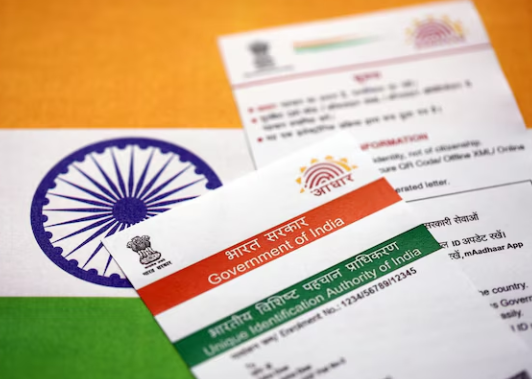
The Aadhaar card download file is valid as an e-Aadhaar across India and can be used for KYC, banking, or personal verification purposes. Many secure financial platforms rely on Aadhaar-based verification to simplify customer onboarding and make digital transactions faster.
One such example is the Airtel Finance Personal Loan, which allows instant online loan approvals through a quick Aadhaar-linked e-KYC process, helping customers complete the entire procedure safely.
| What You Must Know: The Aadhaar card download file is valid as an e-Aadhaar across India and can be used for KYC, banking, or personal verification purposes. |
4. Using Public Wi-Fi or Shared Devices
Downloading Aadhaar on shared computers or public Wi-Fi exposes you to security threats. Hackers can intercept data or store files without your knowledge. Always download using a secure, private network and delete downloaded copies from shared systems.
Data protection is crucial whether you are downloading Aadhaar or applying for a fast cash loan. Always choose trusted networks for sensitive transactions.
5. Forgetting to Update Aadhaar Before Downloading
Many people face mismatch errors because their Aadhaar information is outdated. For instance, if your address or number has changed, you must update it first via UIDAI before attempting another Aadhaar card download.
| Issue | Reason | Recommended Fix |
| OTP not received | Old number registered | Update mobile number at Aadhaar centre |
| Name mismatch | Old records | Use UIDAI’s online update service |
| Invalid file | Outdated data | Re-download after data update |
Updating your Aadhaar is like refinancing a loan — you’re correcting your information for better access. For example, debt refinancing can smooth out financial processes much like updated Aadhaar details smooth out e-services.
The Bottom Line: Safe Downloads, Smarter Choices
Downloading Aadhaar is a simple digital task, yet small errors can lead to major inconvenience or data risks. From entering incorrect details to using unsafe platforms, every mistake adds an unnecessary hurdle. By staying careful and using only official channels, anyone can complete an Aadhaar card download quickly.
For those seeking safe and instant access to financial services, Airtel Finance Personal Loan provides an easy option for personal funding with flexible EMIs and low interest rates. Check out Airtel Finance Personal Loan today for a 100% digital and secure loan process.
FAQs
1. What is the safest way to complete an Aadhaar card download?
The safest way is to download directly from UIDAI’s official website or the mAadhaar app using your registered mobile number.
2. Why does my Aadhaar card download show an invalid password?
You may be entering the wrong password. Use the first four capital letters of your name followed by your birth year.
3. Can I download my Aadhaar without a registered mobile number?
No, OTP verification is mandatory. You must have your current mobile number linked to Aadhaar for successful download.
4. Is the e-Aadhaar downloaded file as valid as the physical card?
Yes, the e-Aadhaar PDF downloaded from UIDAI holds equal validity to the physical Aadhaar for identification and KYC purposes.
5. What should I do if I don’t receive the OTP during Aadhaar card download?
Check network connectivity, registered number status, or wait briefly. If unresolved, update your mobile number at an Aadhaar centre.