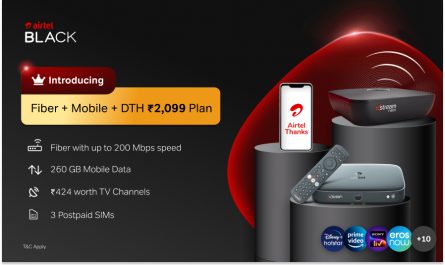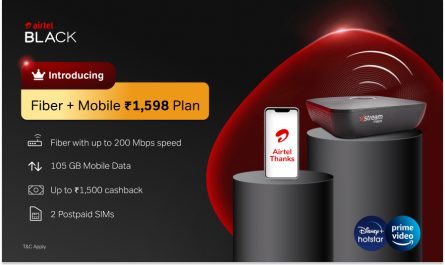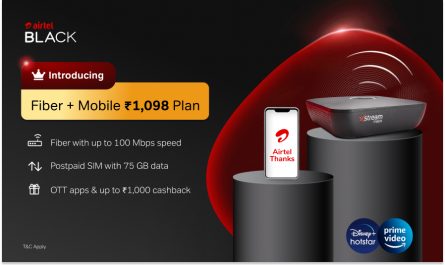
Managing your television viewing experience starts with understanding your options. When you subscribe to an Airtel Black package combining Wi-Fi and DTH services, you receive a structured entertainment bundle with specific customisation parameters that differ from standard DTH offerings.
This guide walks you through accessing your channel lineup, understanding pack structures, adding or removing channels through multiple methods, recognising plan limitations, and optimising your viewing experience within Airtel Black’s framework.
Understanding Your Airtel Black Pack Structure
Your Airtel Black channel list operates differently from regular DTH subscriptions. You must select a base pack from predefined options, typically priced between ₹350 and ₹550. These packs bundle channels by language and region.
Regional variations exist across India. Plans starting at ₹399 include 260+ channels, while higher-tier plans from ₹599 to ₹3,999 offer 350+ channels with varying Wi-Fi speeds. The ₹599 plan specifically serves Bihar, Chhattisgarh, Gujarat, Haryana, Himachal Pradesh, Jammu & Kashmir, Jharkhand, Kerala, Madhya Pradesh, Odisha, Rajasthan, Uttar Pradesh East, Uttar Pradesh West, and West Bengal.
Methods to Access Your Channel List
Using Channel 998 on Your Set-Top Box
Your remote control provides direct access to channel management. Simply:
- Switch on your television
- Navigate to channel 998 using your remote
- Wait for the Help page to load
- Use directional keys to reach the “Add Channels” tab
- Follow on-screen instructions
- Note the confirmation code displayed
- Send this code to 54325 to complete additions
This method works well for reviewing your current Airtel Black channel list and understanding available options within your subscription tier.
Through the Airtel Thanks App
The mobile application offers comprehensive channel management capabilities. Access your DTH connection details by opening the app and clicking the “Services” tab. Navigate to the DTH section, entering your customer ID when prompted.
You’ll find three categories under “Add channel”:
- VAS (Value Added Services)
- Broadcaster bouquets
- A-la-carte channels
Select ‘A la carte’ for individual channel additions. The app displays current pricing and allows you to make immediate changes to your Airtel Black channel list.
Adding and Removing Channels via SMS
Quick SMS Commands
SMS remains the fastest method for channel modifications. From your registered mobile number, send these commands to 54325:
To add channels:
- Type: ADD
- Example: ADD 301
- You’ll receive confirmation once processed
To remove channels:
- Type: REM
- Example: REM 301
- Confirmation follows successful removal
From non-registered numbers:
- Type: ADD
- Verify with the OTP sent to your registered number
This SMS system works around the clock, making your DTH connection management convenient anytime.
Website Management Options
Visit Airtel’s official website and log in using your registered number or customer ID. Navigate to the DTH section and click “Manage TV Channels”. Select “Edit current plan” to modify your Airtel Black channel list. The interface displays available channels with pricing, so you can review changes before confirming.
Optimising Your Channel Selection
Strategic Pack Selection
Review base packs thoroughly before committing. Identify channels you watch regularly and ensure your chosen pack includes most of them. Calculate whether upgrading to a higher-tier base pack offers better value than adding multiple à la carte channels.
Consider regional availability when selecting packs. Different regions offer varied pack compositions and pricing structures within the Airtel Black framework.
Cost-Effective Management Tips
Monitor your viewing habits monthly. Remove unwatched channels to optimise costs. Use the Airtel Thanks app for visual comparisons of pack contents and pricing rather than relying solely on SMS commands.
Check for seasonal promotions or pack updates. Airtel occasionally revises pack compositions, potentially adding channels to existing tiers without price increases.
Channel Categories and Availability
Your DTH connection provides access to a wide range of content categories. Music channels, free-to-air options, news networks, sports programming, and entertainment channels each occupy designated number ranges. The Hindi Ultimate Plus HD Pack, for example, includes 23 HD channels and 359 SD channels.
Understanding channel numbering helps streamline additions via SMS. Reference category-specific channel numbers when customising your Airtel Black channel list to avoid errors.
Summing Up
Managing your Airtel Black channel list requires understanding its structured framework. Whilst limitations exist compared to standard DTH offerings, multiple management methods provide flexibility within defined parameters. Use SMS commands for quick changes, the Airtel Thanks app for comprehensive management, or channel 998 for on-screen navigation.
Remember that base pack selection significantly impacts your viewing experience and costs. Strategic planning ensures you maximise value within Airtel Black’s bundled approach. For those seeking premium entertainment packages with integrated Wi-Fi and television services, exploring Airtel’s complete DTH solutions reveals how high-definition viewing, customisation options within structured packs, and 24/7 customer support create comprehensive home entertainment experiences tailored to Indian audiences.
Disclaimer: Plan prices and offers may change by region and are subject to change. Please check the latest details on Airtel’s official page before purchase.